How to Configure WordPress Permalink Structure
Permalinks are one of the most important yet often overlooked settings in WordPress. They determine the structure of your website URLs and play a significant role in search engine optimization (SEO), user experience, and website organization.
By default, WordPress generates URLs that contain post IDs and query strings, which are not very descriptive or user-friendly. Fortunately, WordPress allows you to customize your permalink structure, making your URLs cleaner, easier to read, and more beneficial for SEO.
In this guide, you'll learn what WordPress permalinks are, why they matter, and how to configure the permalink structure on your WordPress website.
What Is a WordPress Permalink?
A permalink (short for "permanent link") is the URL used to access a specific page, post, category, or other content on your website.
For example, a default WordPress URL may look like this:
https://example.com/?p=63
While functional, this URL does not provide any information about the content of the page.
A more user-friendly permalink would look like:
https://example.com/how-to-configure-wordpress-permalink-structure
This format is easier for visitors to understand and helps search engines identify the topic of the page.
Important Considerations Before Changing Permalinks
Changing permalink settings on an established website can affect existing URLs.
Before making changes:
- Create a Backup
- Set Up Redirects
- Update Internal Links
Understanding WordPress Permalink Structures
WordPress provides several predefined permalink options.
Plain
Example:
https://example.com/?p=123
This is the default WordPress setting. While it works, it offers little SEO value and is not recommended.
Day and Name
Example:
https://example.com/2026/06/13/sample-post/
This structure includes the publication date and post title.
Best for:
-
News websites
-
Daily blogs
-
Content where publication date is important
Month and Name
Example:
https://example.com/2026/06/sample-post/
This format includes the year, month, and post title.
Best for:
-
Magazine websites
-
Regular blogging websites
Numeric
Example:
https://example.com/archives/123
This structure uses archive IDs and offers limited SEO benefits.
Post Name
Example:
https://example.com/sample-post/
This is the most popular and SEO-friendly permalink structure.
Best for:
-
Business websites
-
Corporate websites
-
Portfolios
-
Most blogs
-
Online stores
Custom Structure
Example:
https://example.com/category/post-name/
This option allows you to create a fully customized URL structure using WordPress tags.
Popular tags include:
-
%postname% -
%category% -
%year% -
%monthnum% -
%day% -
%author%
How to Configure WordPress Permalink Structure
Follow these steps to change your permalink settings.
Step 1: Log in to WordPress
Access your WordPress Admin Dashboard using an administrator account.

Step 2: Open Permalink Settings
From the dashboard menu:
Settings → Permalinks
The Permalink Settings page will open.

Step 3: Select a Permalink Structure
Under the Common Settings section, choose the URL format you want to use.
Available options include:
-
Plain
-
Day and Name
-
Month and Name
-
Numeric
-
Post Name
-
Custom Structure
For most websites, selecting Post Name is highly recommended because it creates clean and SEO-friendly URLs.

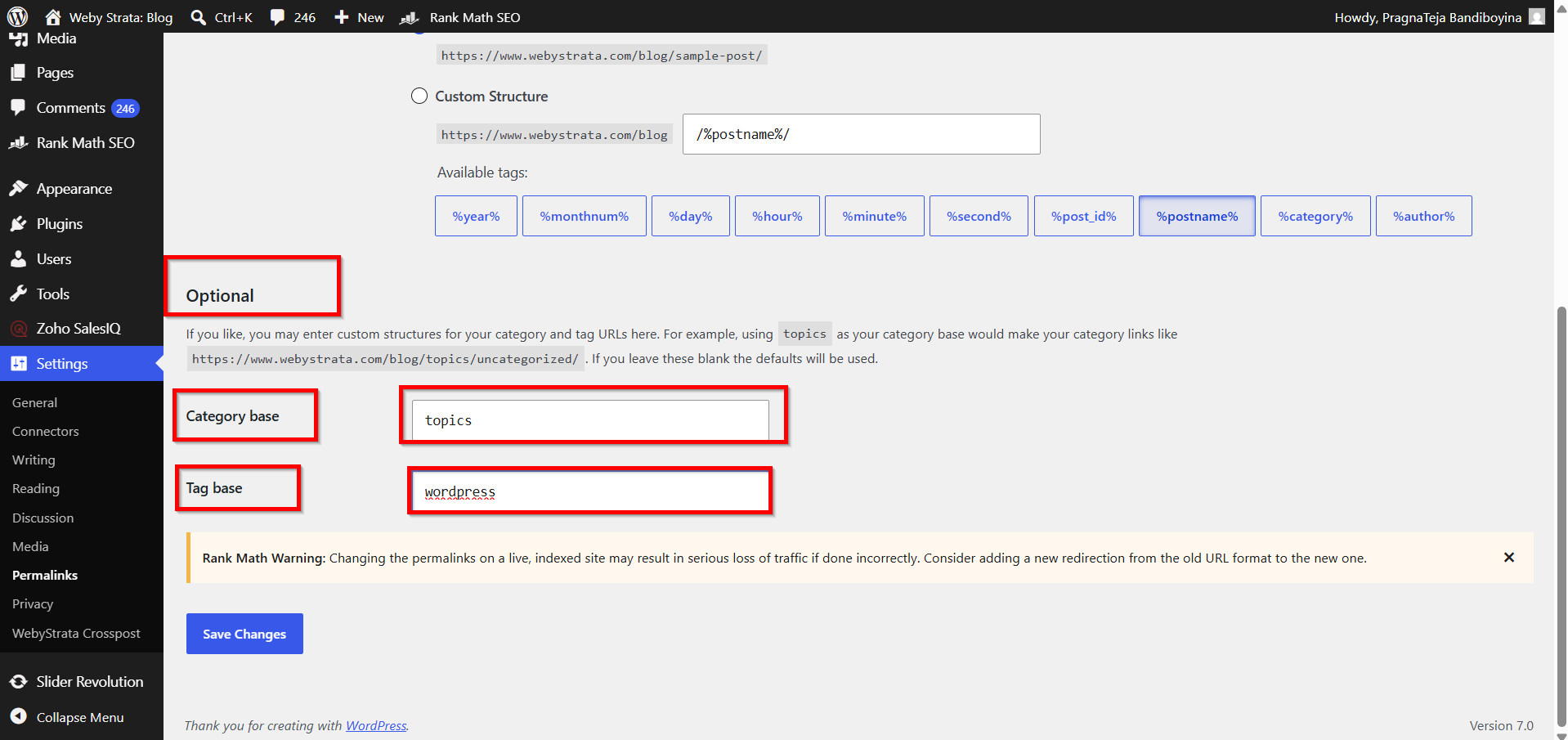
Step 4: Configure Optional Settings
Scroll down to the Optional section.
Here you can customize:
Category Base
By default:
https://example.com/category/tutorials
You can replace "category" with a custom term such as:
https://example.com/topics/tutorials
Simply enter:
topics
in the Category Base field.
Tag Base
By default:
https://example.com/tag/wordpress
You can customize it to:
https://example.com/topics-tag/wordpress
Enter your preferred value in the Tag Base field.
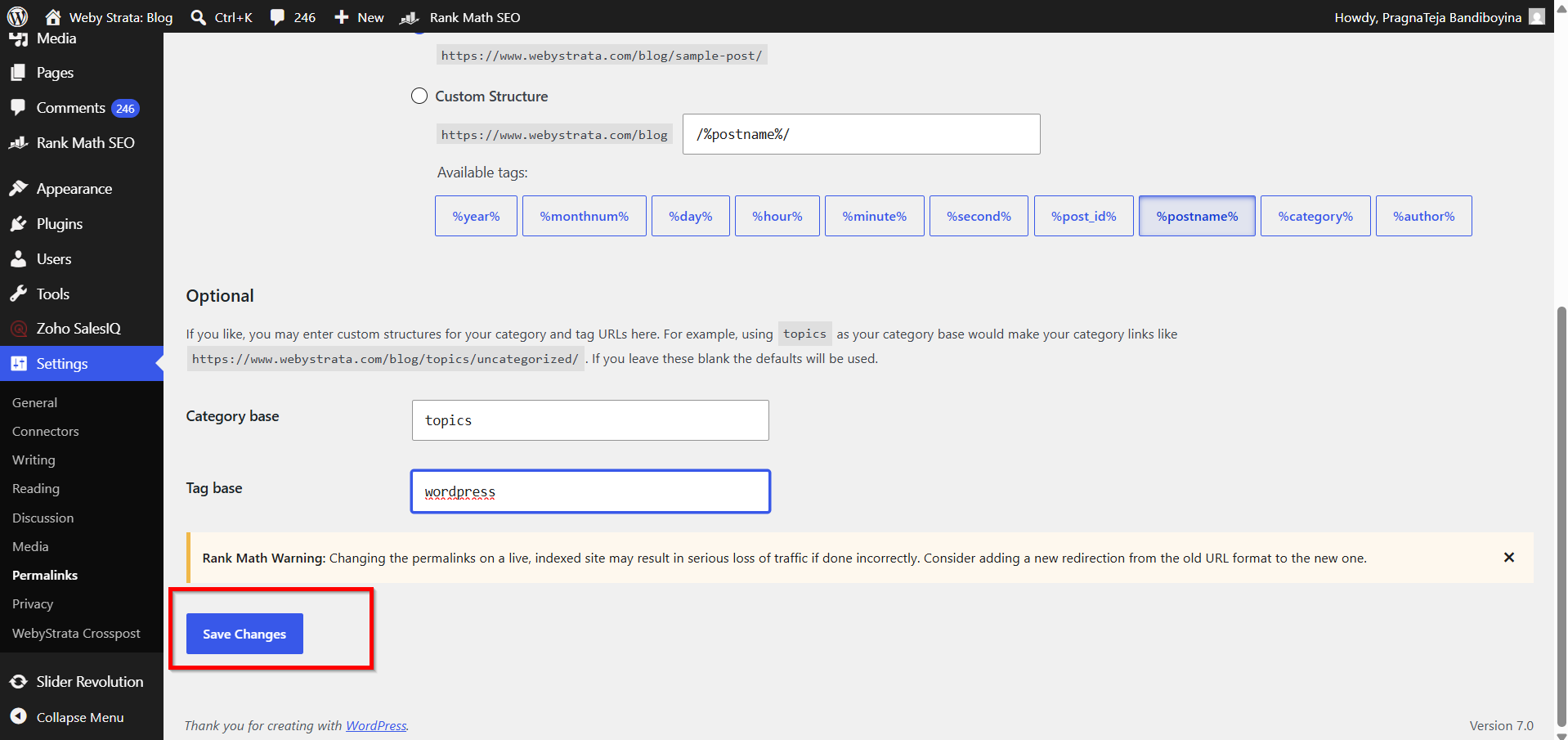
Step 5: Save Changes
Click the Save Changes button.
WordPress will immediately update the permalink structure for your website.
Best Practices for WordPress Permalinks
Follow these best practices when creating URLs:
-
Use descriptive keywords.
-
Keep URLs short and simple.
-
Avoid special characters.
-
Use hyphens instead of underscores.
-
Do not frequently change permalink structures.
-
Remove unnecessary dates unless they are important for your content.
-
Maintain a consistent URL structure across your website.
Why Are Permalinks Important?
Choosing the right permalink structure offers several benefits:
1. Improved SEO
2. Better User Experience
3. Easier Content Sharing
4. Simplified Website Management
5. Increased Click-Through Rates
Benefits of Configuring WordPress Permalink Structure
-
Improves Search Engine Optimization (SEO)
Clean and descriptive URLs help search engines understand your content better, which can improve your website's visibility in search results. -
Enhances User Experience
Visitors can easily identify what a page is about by looking at the URL, making navigation more intuitive and user-friendly. -
Creates Professional and Readable URLs
Custom permalinks replace confusing URL parameters with meaningful words, giving your website a more professional appearance. -
Makes Content Easier to Share
Short, keyword-rich URLs are easier to remember, copy, and share across social media, emails, and other platforms. -
Improves Website Organization
A well-structured permalink format helps organize posts, pages, categories, and archives, making content management more efficient as your website grows.
Conclusion
Configuring the WordPress permalink structure is a simple but powerful way to improve your website's SEO, usability, and overall professionalism. Instead of relying on the default URL format, choose a structure that clearly describes your content and makes navigation easier for both users and search engines.
For most WordPress websites, the Post Name permalink structure provides the best balance of simplicity, readability, and SEO performance. By taking a few minutes to configure your permalinks correctly, you can create cleaner URLs that help your website perform better in search results and provide a better experience for your visitors.